We are the digital agency
crafting brand experiences
for the modern audience.
We are Fame Foundry.

See our work. Read the Fame Foundry magazine.

We love our clients.

Fame Foundry seeks out bold brands that wish to engage their public in sincere, evocative ways.


WorkWeb DesignSportsEvents

Platforms for racing in the 21st century.

Fame Foundry puts the racing experience in front of millions of fans, steering motorsports to the modern age.

“Fame Foundry created something never seen before, allowing members to interact in new ways and providing them a central location to call their own. It also provides more value to our sponsors than we have ever had before.”

—Ryan Newman

Technology on the track.

Providing more than just web software, our management systems enhance and reinforce a variety of services by different racing organizations which work to evolve the speed, efficiency, and safety measures, aiding their process from lab to checkered flag.

WorkWeb DesignRetail

Setting the pace across 44 states.

With over 1100 locations, thousands of products, and millions of transactions, Shoe Show creates a substantial retail footprint in shoe sales.

The sole of superior choice.

With over 1100 locations, thousands of products, and millions of transactions, Shoe Show creates a substantial retail footprint in shoe sales.

WorkWeb DesignRetail

The contemporary online pharmacy.

Medichest sets a new standard, bringing the boutique experience to the drug store.

Integrated & Automated Marketing System

All the extensive opportunities for public engagement are made easily definable and effortlessly automated.

Scheduled promotions, sales, and campaigns, all precisely targeted for specific demographics within the whole of the Medichest audience.

WorkWeb DesignSocial

Home Design & Decor Magazine offers readers superior content on designer home trends on any device.


  • By selectively curating the very best from their individual markets, each localized catalog comes to exhibit the trending, pertinent visual flavors specific to each region.


  • Beside the swaths of inspirational home photography spreads, Home Design & Decor provides exhaustive articles and advice by proven professionals in home design.


  • The art of home ingenuity always dances between the timeless and the experimental. The very best in these intersecting principles offer consistent sources of modern innovation.

WorkWeb DesignSocial

  • Post a need on behalf of yourself, a family member or your community group, whether you need volunteers or funds to support your cause.


  • Search by location, expertise and date, and connect with people in your very own community who need your time and talents.


  • Start your own Neighborhood or Group Page and create a virtual hub where you can connect and converse about the things that matter most to you.

775 Boost email open rates by 152 percent

Use your customers’ behavior to your advantage.

479 Why design affects your bottom line

If you don't value your image, your customers won’t either.

June 2021
Noted By Joe Bauldoff

The Making and Maintenance of our Open Source Infrastructure

In this video, Nadia Eghbal, author of “Working in Public”, discusses the potential of open source developer communities, and looks for ways to reframe the significance of software stewardship in light of how the march of time constantly and inevitably works to pull these valuable resources back into entropy and obsolescence. Presented by the Long Now Foundation.
Watch on YouTube

December 2016
By Kimberly Barnes

Going the Distance: Four Ways to Build a Better Customer Loyalty Program for Your Brand

Loyalty programs are no longer a novelty. That means that yesterday’s strategies won’t work moving forward, so look for ways to rise above the noise, setting yourself apart from the cloying drone of countless other cookie-cutter programs.
Read the article

Going the Distance: Four Ways to Build a Better Customer Loyalty Program for Your Brand

article-thedistance-lg It’s easy enough for a customer to join your loyalty program, especially when you’re offering an incentive such as discounts. All your customer has to do is give out some basic information, and voila! They’re in the fold, a brand new loyalty member with your company. From there, it’s happily ever after. You offer the perks; they stand solidly by you, bringing you their continued business. Simple. Or is it? In reality, just how many of those customers are act ively participating in your loyalty program? Do you know? Sure, loyalty program memberships are on the rise according to market research company eMarketer, having jumped 25 percent in the space of just two years. However, that figure may be a bit misleading. The truth is that, while loyalty program sign-ups may be more numerous, active participation in such programs is actually in decline. At the time of the study, the average US household had memberships in 29 loyalty programs; yet consumers were only active in 12 of those. That’s just 41 percent. And even that meager figure represents a drop of 2 percentage points per year over each of the preceding four years, according to a study by loyalty-marketing research company COLLOQUY.

When discounts just aren’t enough

So what’s a brand to do? How can you make your loyalty program worth your customer’s while—as well as your own? After all, gaining a new loyalty member doesn’t mean much if your customer isn’t actively participating in your program. Consider this: Does your customer loyalty program offer members anything different from what your competitors are offering? Chances are your program includes discounts. That’s a given. And what customer doesn’t appreciate a good discount? But when every other company out there is providing this staple benefit in comparable amounts, it becomes less and less likely that customers will remain loyal to any one particular brand. Frankly, it’s all too easy for customers to get lost in a sea of loyalty member discounts. They’re everywhere. In fact, just under half of internet users perceive that all rewards programs are alike, according to a 2015 eMarketer survey. The key to success, then, is to differentiate your business from the crowd. If you can offer your customers something unique and valuable beyond the usual discount, chances are they’ll be more likely to stick with your brand. Here’s some inspiration from companies who get it.

Virgin: Reward more purchases with more benefits.

That’s not to say you need to get rid of discounts entirely. In fact, nothing could be further from the truth. Customers still love a good discount. The goal is to be creative in terms of the loyalty perks you offer. Take the Virgin Atlantic Flying Club, for example. As part of its loyalty program, the airline allows members to earn miles and tier points. Members are inducted at the Club Red tier, from which they can move up to Club Silver and then Club Gold. Here, it’s not just a discount. It’s status. And people respond to feeling important, elite. Still, even where the rewards themselves are concerned, Virgin is motivating loyalty customers with some pretty attractive offers. At the Club Red tier, members earn flight miles and receive discounts on rental cars, airport parking, hotels and holiday flights. But as members rise in tiers, they get even more. At the Club Silver tier, members earn 50 percent more points on flights, access to expedited check-in, and priority standby seating. And once they reach the top, Club Gold members receive double miles, priority boarding and access to exclusive clubhouses where they can get a drink or a massage before their flight. Now that’s some serious incentive to keep coming back for more. Discounts are still part of the equation – but they are designed with innovation and personal value in mind, elevating them to more than just savings.

Amazon Prime: Pay upfront and become a VIP.

What if your customers only had to pay a one-time upfront fee to get a year’s worth of substantial benefits? It may not sound like the smartest business idea at first glance. But take a closer look. Amazon Prime users pay a nominal $99 a year to gain free, two-day shipping on millions of products with no minimum purchase. And that’s just one benefit of going Prime. It’s true that Amazon loses $1-2 billion a year on Prime. This comes as no surprise given the incredible value the program offers. But get this: Amazon makes up for its losses in markedly higher transaction frequency. Specifically, Prime members spend an average of $1,500 a year on Amazon.com, compared with $625 spent by non-Prime users, a ccording to a 2015 report from Consumer Intelligence Research Partners.

Patagonia: Cater to customer values.

Sometimes, the draw for consumers isn’t saving money or getting a great deal. The eco-friendly outdoor clothing company Patagonia figured this out back in 2011, when it partnered with eBay to launch its Common Threads Initiative: a program that allows customers to resell their used Patagonia clothing via the company’s website. Why is this program important to customers? And how does it benefit Patagonia? The company’s brand embraces environmental and social responsibility, so it was only fitting that they create a platform for essentially recycling old clothing rather than merely throwing it away. The Common Threads Initiative helps Patagonia build a memorable brand and fierce loyalty by offering its customers a cause that aligns with deep personal values. OK, so their customers get to make a little money, too. Everybody wins.

American Airlines: Gamify your loyalty program.

If you’re going to offer your customers a loyalty program, why not make it f un? After all, engagement is key to building a strong relationship with your customer. And what better way to achieve that goal than making a game of it. American Airlines had this very thing in mind when it created its AAdvantage Passport Challenge following its merger with USAirways. The goal: find a new way to engage customers as big changes were underway. Using a custom Facebook application, American Airlines created a virtual passport to increase brand awareness while offering members a chance to earn bonus points. Customers earned these rewards through a variety of game-like activities, from answering trivia questions to tracking travel through a personalized dashboard. In the end, participants earned more than 70 percent more stamps than expected – and the airline saw a ROI of more than 500 percent. The takeaway: people like games.

Stand out from the crowd.

Your approach to your customer loyalty program should align with your overall marketing approach. Effective branding is about standing out, not blending it. Being memorable is key. To this end, keep in mind that loyalty programs are no longer a novelty. That means that yesterday’s strategies won’t work moving forward, so look for ways to rise above the noise, setting yourself apart from the cloying drone of countless other cookie-cutter programs.


June 2011
By The Architect

Is Your Website Ready for the Tablet Revolution?

Here are nine critical elements you must examine now to make sure your site continues to perform as your customers ditch their desktops for tablets.
Read the article

Is Your Website Ready for the Tablet Revolution?

tablet

The revolution is here.

When Apple launched the iPad last year, it carved out a new category in the mobile device marketplace. With the release of the iPad 2 and newer challengers like the Motorola Xoom and the Samsung Galaxy now joining the fray, the market continues to heat up as more and more users opt to perform everyday tasks like browsing the Web, sending email, watching videos and playing games on tablet devices rather than their desktops, laptops or netbooks.

In fact, according to a recent study conducted by Nielsen, 35 percent of tablet owners polled said they now use their desktop computer less or not at all while 32 percent of respondents said the same of their laptop. The top five reasons cited for preferring the tablet over a desktop or laptop were portability (31 percent), easier interface (21), start-up speed (15), convenience (12) and size (12).

Additionally, Forrester Research forecasts that tablet sales in the U.S. will continue to climb sharply, from 10.3 million in 2010 to 24.1 million in 2011 to 44 million in 2015. The firm also projects that by 2015, 82 million people in the U.S. will own a tablet, a figure which represents one third of the total online population.

What do these numbers mean for you? With each passing day, the likelihood that consumers will be interacting with your brand via a tablet rather than a desktop or laptop is increasing. As we demonstrated previously, not all brands can or should release a native app, and even if you do, you shouldn’t neglect those users who will be surfing your primary site on a tablet-based browser.

As a result, it’s up to you to make sure that your website evolves to provide these users with a high-quality, hassle-free experience, or else you’ll risk losing them to competitors that do.

Here are nine critical elements you must examine now to make sure your site will continue to serve the needs of your customers and support the growth of your business in the era of the tablet:

Balance of content vs. interface

Vogue

Tablet screens are much smaller than desktop or laptop screens, yet the primary use of tablets is for consuming content. Therefore, it’s important to make sure that your website’s interface is clean and clutter-free so that you make optimal use of the available real estate and allow your content to take center stage.

Typography

MarketShare

The type on your website must strike a happy medium for tablet users. If it’s too small or condensed, it will be illegible without zooming in. If it’s too big, users will be forced to scroll more than necessary.

You must find the ideal balance of font face, font size, line spacing and line length so that your content is pleasant and comfortable to read at the distance at which a user would naturally hold a tablet.

Color and texture

MobileMe

Color and texture are more than cosmetic niceties. When applied in strategic ways, they can go a long way toward improving the usability of your site for tablet users. For example, a subtle gradient on top of a button can provide a visual cue to users that it is an actionable object.

Keep in mind as well that with tablet users, you’re fighting finger smudges and glare for visibility. Bright background colors and patterns can reduce interference from these elements, while solid black tends to make them more distracting.

Buttons and links

Nike buttons

When it comes to the tools your visitors use to travel around your website, size matters.

For tablet users, the clicking and scrolling of a mouse are replaced by touching and swiping gestures. As a result, navigation actions are less precise on touchscreens. You must allow a greater margin of error by creating buttons that are the size of a fingertip rather than a cursor.

Also, make sure to allow a little breathing room around your buttons and links, especially those that live in your site’s main navigation. Nothing will frustrate a user faster than being directed to a different page than the one they wanted because your links are crammed together too tightly.

Interface cues

BBC

If your website’s interface currently relies heavily on rollover effects, you’re going to be in trouble on a tablet. In the world of the touchscreen, there is no such thing as a hover state. If, for example, you have “previous” and “next” buttons that appear only when the mouse is nearby, those elements will be unavailable to your tablet users.

To create finger-friendly navigation, all elements must be big, bold and obvious. Replace buttons that require users to mouse over them to get a sense of action with style enhancements that draw attention to their “pressability.”

Menus

Mascot menu

If your site contains drop-down menus, make sure there are visual cues (such as small up and down arrows) to indicate that the menu is expandable and that the menu remains open on tap.

Alternatively, you might consider streamlining your navigation to eliminate the need for drop-down menus altogether. Instead, you can create a showcase page for each main section of your site that acts as a gateway to the subpages contained within.

Scrolling

InStyle horiz

InStyle vert

Screens on the tablet devices that are currently on the market range from approximately 7 to 10 inches and allow viewing in both vertical and horizontal orientation. As a result, there’s no way to be able to accurately predict what a tablet surfer will see without having to scroll.

The good news here is that tablet device users expect to scroll – not just vertically but horizontally as well. There’s no need to worry about trying to force all your important information to fit “above the fold.” Clean, streamlined design that promotes easy content consumption is the name of the game.

Forms

Lothery form field

Many of the most critical interactions between your website and your customers occur through forms, whether it’s subscribing to email updates, requesting more information, logging into a secure account or completing a purchase.

Examine your forms closely to ensure that all fields render clearly. Also, make sure your forms are as streamlined as possible. Trying to complete a long form with many fields on a tablet is cumbersome. While the marketer in you wants to collect as much data as possible from your site visitors, the danger of requiring users to complete too many fields is that they’ll get frustrated and give up, leaving you with no data at all or, even worse, a potential sale lost.

Flash

TIn Man

Apple’s iOS does not – and probably never will – support Flash. Android does support Flash, but the performance of Flash content on Android devices thus far has been less than ideal.

If you have Flash anywhere on your site – whether it’s in the introduction to your site, your navigation menus or video – get rid of it now, or else your tablet users will be plagued with problems. Today there are better, more tablet-friendly options available, such as HTML5 and JavaScript, that can replicate the same effects that once required Flash.

When in doubt, test it out.

The only way to be confident about how well your site performs on a tablet is to put it through the paces on actual tablet devices. While there are some web-based simulators, they aren’t 100 percent reliable since they are ultimately limited by using your desktop browser to render your site.

If you don’t already own a tablet, borrow one or – if all else fails – make a trip to your local retailer and use the display models there.

Be sure to evaluate every element and every page of your site carefully. If possible, recruit other friends, colleagues or family members to do the same, and observe them as they navigate through your site. Because they aren’t as intimately familiar with your site and its nuances as you are, they may uncover stumbling blocks that you might have overlooked.

If you identify any problem areas, seek out the help of a trusted website design firm to address them. While you may have to make an investment in upgrading the infrastructure of your site, it will be money well spent to make sure current and prospective customers can access your site on their device of choice – which is more and more likely to be a tablet.


November 2013
By Jeremy Girard

Get it Type: Six Fundamentals of Good Typography in Website Design

If the content on your website is your brand’s message, then the typography is the voice with which your site speaks that message.
Read the article

Get it Type: Six Fundamentals of Good Typography in Website Design

Typography is often one of the least appreciated – yet most important – aspects of website design. So much more than just the “font” that is used to present your site’s content, the choice of typeface does as much to set the tone of the site as the colors, images and other visual components of the design. If the content on your website is your brand’s message, then the typography is the voice with which your site speaks that message. The study of typography has a long and rich history. While designers work for years to perfect this practice, by cultivating an understanding of a few basic principles, you can more effectively communicate with your design team as you work collaboratively to make the right typography choice for your website and, through those choices, find the perfect voice for your site. Here are six fundamentals of good typographic design that will help you avoid potential pitfalls and make sound aesthetic choices that will strike the right tone and support the delivery of your message:

1. Know what’s possible.

If you’ve been involved in a website design project in the past, then you’ve likely heard the phrase “web-safe fonts.” For years, limitations in web browsers forced us to utilize a very small group of fonts for our websites. If you requested the use of a font that fell outside of this select group, you would have been directed, instead, to one of these web-safe fonts so that the site’s text could be reliably displayed across a wide variety of browsers. In the past few years, however, this restriction has been greatly minimized as a new feature called @font-face (pronounced “at font face”) has been introduced, allowing us to make use of thousands of new fonts on our websites in a reliable way. This is both a blessing and a curse. The blessing lies in the ability to use the wide array of wonderful typefaces available to us today to create incredibly rich and unique designs. The curse is that, with so many options, it’s all too easy to overdo it and create a muddled mess with competing typefaces that obfuscate the message you are trying to send. Also, despite all of the advancements made in web fonts in the past few years, there are still limitations to what we can and cannot do with fonts on websites, so ask your web design team about these limitations to ensure you make choices that will work on a technical level.

2. Make strategic use of different font classifications.

Different font classifications have different feels and serve different purposes, so developing an understanding of these classifications is a good place to start.

Serif

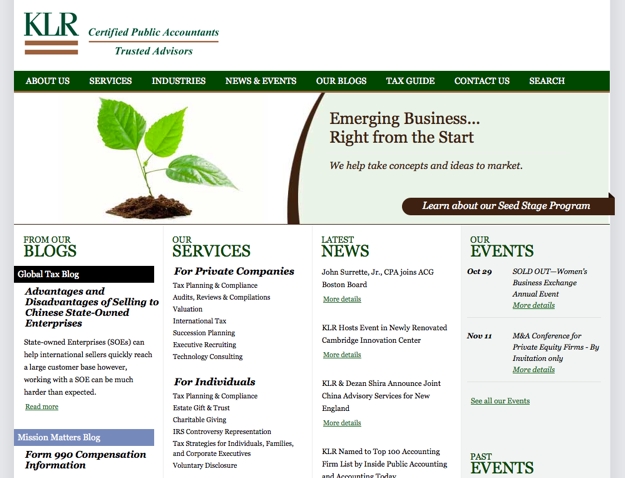
A serif is “any of the short lines stemming from, and at an angle to, the upper and lower ends of the strokes of a letter.” If you look at a font like Times New Roman, you will notice the little flourishes that hang off the ends of each letter, adding an extra embellishment to those letterforms. Besides Times New Roman, other popular serif fonts include Georgia, Baskerville, Garamond and Palatino. Serif fonts are often used when you want to convey a sense of history or tradition in a design. Historically, serif fonts were used in the body text of printed works because they made large blocks of text easy to read. For computer screens, serif fonts are very versatile and can be used effectively for either body text or headlines. The accounting and business consulting firm KLR uses the serif font Georgia throughout their site to create a look that conveys a sense of professionalism, trustworthiness and experience. KLR
Sans-serif

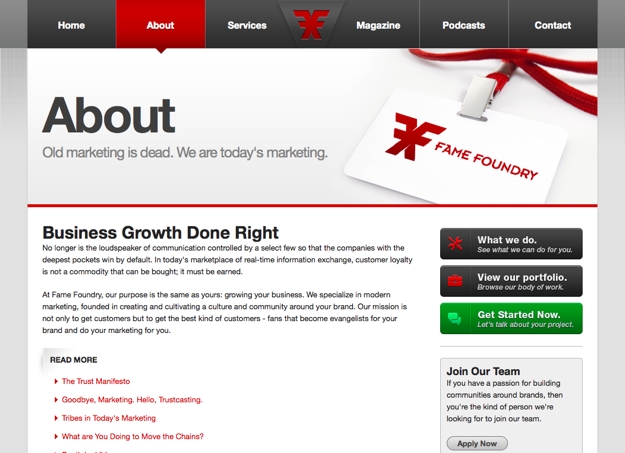
Sans-serif, or “without serif,” fonts feature letterforms that do not have the extra embellishments found on serif fonts. Common sans-serif fonts include Arial, Helvetica, Verdana, Futura and Tahoma. In printed text, sans-serif fonts were typically used only as headlines because it was easier to read body text set as a serif font rather than a sans-serif, but for computer screens and websites, sans-serif fonts are equally as readable and versatile as serif fonts, so they can be used either for headlines or body text. The straight lines of sans-serif fonts and the lack of extra ornamentation often make these typefaces good choices to create a sleek, modern look. An example of sans-serif fonts can be found here on Fame Foundry in our navigation, our main billboard message and throughout our site in both headlines and body text. FF
Slab-serif

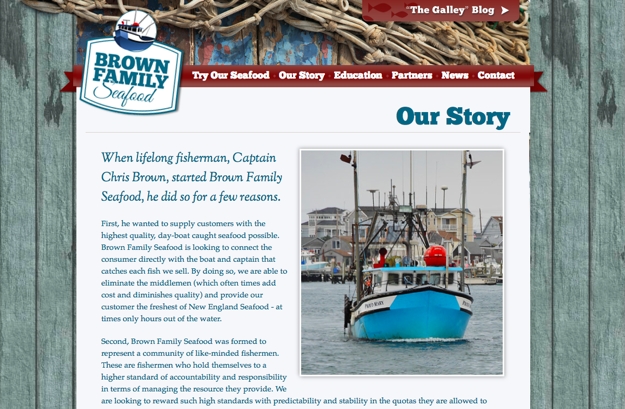
Similar to serif fonts in that they have extra embellishments added to them, slab-serif fonts often feature thicker, chunky letters whose serifs are blocky with little, if any, contrast between thin and thick lines. Typical slab-serif fonts include Rockwell and Clarendon. The bold letterforms and serifs of this font classification often give them a strong, impressive weight when used as headlines. These fonts are typically not used as body text but are often set in large sizes as headlines. An example of slab-serif fonts can be seen in the logo, navigation and main headlines of Brown Family Seafood’s website, which uses a typeface called ChunkFive. Brown
Display

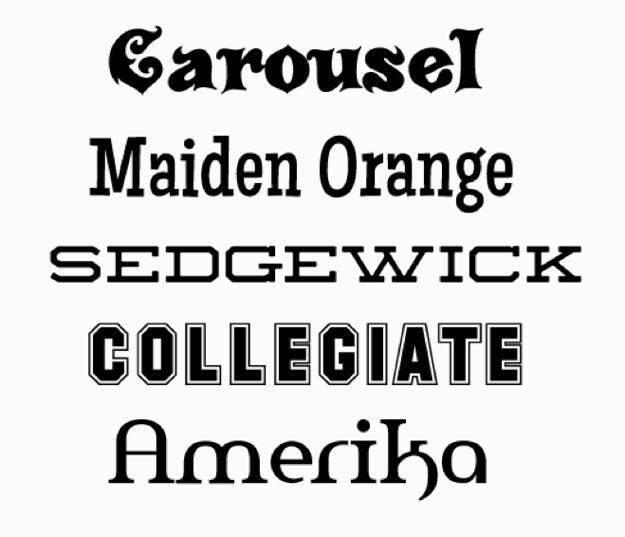
Display fonts are typefaces that are typically only used at large sizes and are therefore better suited to headlines and large messages than body text. Display fonts typically have lots of character to them and are richly designed. With a wide variety of looks and styles available in display fonts, these fonts can be an excellent choice for headlines since they will add that character to the design, but these fonts are also easy to abuse or overuse. Typically, more than one display font in a design is too much. A few examples of display fonts are shown below: display-font
Grunge

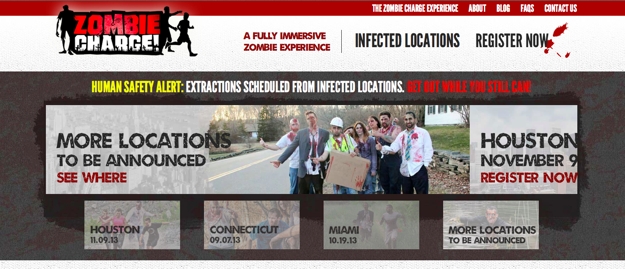
Grunge fonts are typefaces that are designed to show artificial wear, almost like the printing on a vintage t-shirt that has been through the wash many, many times. These fonts, which are also typically used only in headlines or for large, short bursts of text, are a great choice when you are trying to add a worn, textured feel to your design. The city locations listed in the billboard text on Zombie Charge, which tries to recreate a worn and battered look for their zombie-themed adventure runs, uses a grunge font called Umbrage. Zombie
Script

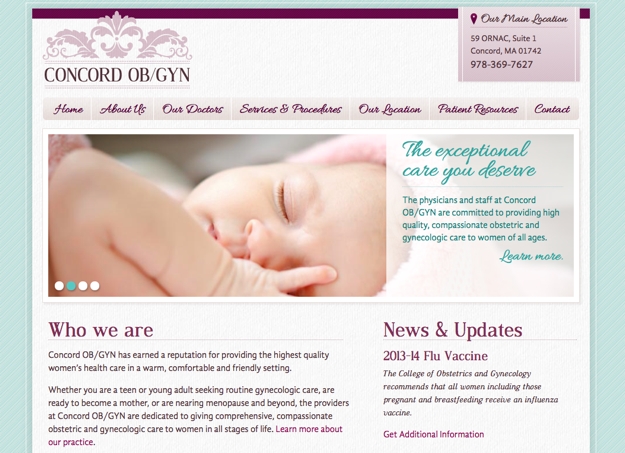
Script fonts have a classy, elegant feel to them. These fonts typically have long, flowing characters and very thin letterforms. Because of this, script fonts are often only used for headlines and at larger sizes, because if you set these fonts too small, the thin letters become unreadable. Script fonts are a great choice when you are looking for a high-end, elegant feel and tone. You can see a script font, Allura, used in a number of places in the design for Concord OB/GYN, including in their navigation and main billboard messaging. Concord
Hand-drawn

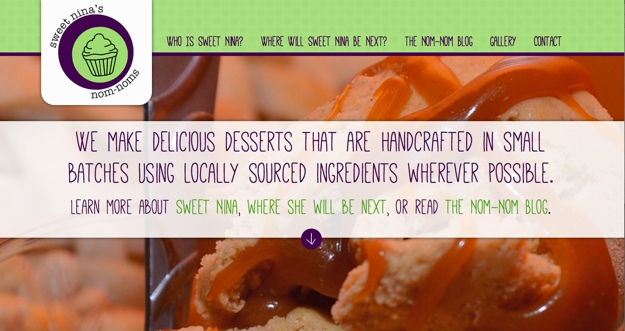
Fonts that are classified as “hand-drawn” have an organic, if perhaps flawed, look to them. If a script font is drawn by a master artist, then a hand-drawn font is scratched out by an everyday writer who may be in a bit of a rush. These fonts can be used to add a human touch to a design and make it feel like an actual person, and not a digital computer, wrote out the words. The font Mathlete that is used on the billboard message for Sweet Nina’s Nom-Noms has an organic, hand-drawn feel to it that reflects the handcrafted desserts that the company offers. Nina
Novelty

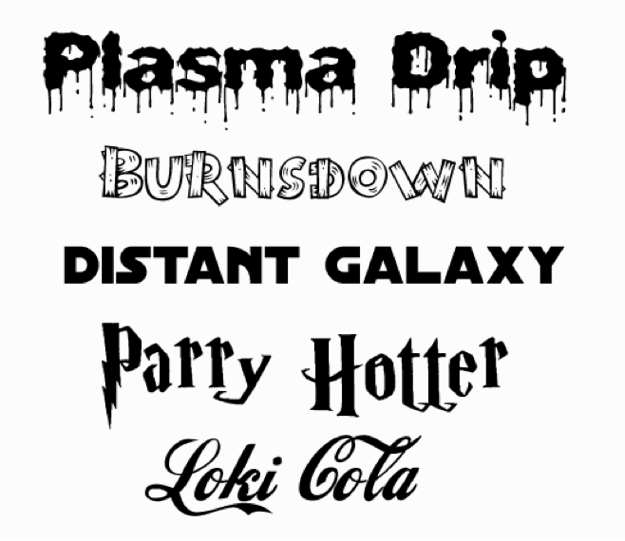
Novelty fonts are often made to replicate popular brands and their distinct characteristic look (think Coca-Cola or Harry Potter). Because of their inextricable association with a well-known brand, these fonts are rarely appropriate to use on a website for another company. Other novelty fonts simulate things like dripping liquid, wood pieces or bones to create the letterforms. While these display fonts are not immediately associated with another brand or company, their overly stylized design also makes them a poor choice for most applications – although if you are going for this type of overly stylized look (for a Halloween-themed billboard message, perhaps), then they can be considered. A few examples of novelty fonts are show below: novelty-font
3. Always preserve readability.

As you undoubtedly noticed in perusing the above overview of font classifications, most of these fonts are meant to be set at large sizes as headlines. Only serif and sans-serif fonts are versatile enough to be used effectively for both headlines and body text. This is because of readability. If the font you use for your website is your site’s voice, you not only want to be sure the voice is appropriate for your brand but also that the voice speaks clearly. In this case, “speaking clearly” means having text that is easy to read. The overly stylized letterforms of grunge or display fonts and the thin letters of script or hand-drawn typefaces make them difficult, if not impossible, to read when set at smaller sizes. Since body text is set at smaller sizes, using these fonts would be an inappropriate choice. Regardless of which font you use, be sure to view it at the size that it will be set at for the actual website and in the colors that will be used. This will allow you to see the contrast that font has when set against its background so you can determine if the choice you have made provides an easy reading experience for your audience.

4. Avoid overused fonts.

Certain fonts carry a stigma with them due to how they may have been used, or overused, in the past. Fonts like Papyrus have been used in so many – often poorly applied – ways that they immediately have a negative association attached to them. In the case of Papyrus, there is even a website called Papyrus Watch that will show you many examples of how this font has been used and abused. Other fonts become overused in a relatively short time. The typeface Gotham was used by the Obama campaign in 2008, and it quickly started showing up everywhere as other designers jumped onto the bandwagon of this suddenly popular font. As a result, Gotham quickly hit the saturation point and now feels cliched. Some fonts may not be overused in general but only in your niche or market. If your competitors all use the same type choices, there is an easily forgettable, vanilla quality to that approach. By choosing a different typeface, you can set yourself and your site apart from your competition right from the start.

5. Practice restraint.

The wealth of fonts available to use today makes it very easy to overdo it, but by practicing restraint and limiting your site to maybe two or three different font choices at most, we can work to avoid overuse. As Robert Bringhurst says in his definitive volume, The Elements of Typographic Style, “Don’t use a font you don’t need.” By limiting your site’s design to only a couple of choices, you’ll create a clean, clear visual rhythm and ensure that the variety of type styles do not create a confusing mess.

6. Choose complementary fonts.

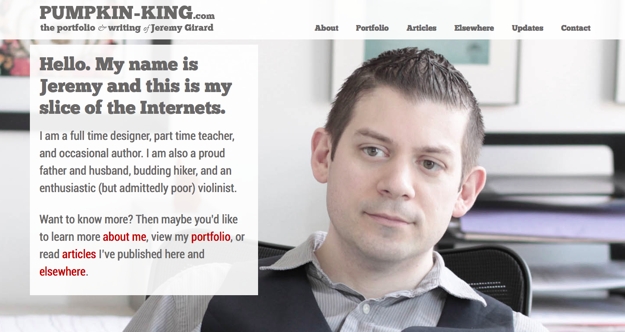
One way to limit your font choices is to select a pair of fonts that contrast and complement each other, perhaps with one choice for headlines and another for body text. This contrast, and the restraint demonstrated by your choices, will help create a professional and readable presentation. A look at my own personal website shows this contrast. The site uses two fonts, the thick slab-serif ChunkFive for the navigation, main billboard message and logo, and a contrasting sans-serif font, Roboto, for the body text. The thick, chunky letterforms of the slab-serif work well alongside the thin, clean letters of the serif, creating a presentation that is easy to read with font choices that do not overpower the messages I am trying to send. pumpkin
In summary

With a basic understanding of typographic best practices, you can better communicate with your design team to select font choices that work best for your organization. Some basics to remember include:
  1. Despite the advancements made in web fonts in the past few years, there are still limitations to what we can and cannot do with fonts on our websites. Ask your web team about these limitations to ensure you make choice that will work on a technical level.
  2. Understand the different font classifications and make choices that reflect the personality of your brand.
  3. Always remember that readability is key and choose fonts set at a size and color contrast that make them easy to read on the screen.
  4. Avoid overused fonts or fonts that carry a negative association with them from the very start.
  5. Don’t overdo it. A few judicious selections should be all you need.
  6. Look for fonts that pair well together. Using one font for headlines and another for body copy is one way you can the number of fonts while still maintaining nice variety and contrast.