We are the digital agency
crafting brand experiences
for the modern audience.
We are Fame Foundry.

See our work. Read the Fame Foundry magazine.

We love our clients.

Fame Foundry seeks out bold brands that wish to engage their public in sincere, evocative ways.


WorkWeb DesignSportsEvents

Platforms for racing in the 21st century.

Fame Foundry puts the racing experience in front of millions of fans, steering motorsports to the modern age.

“Fame Foundry created something never seen before, allowing members to interact in new ways and providing them a central location to call their own. It also provides more value to our sponsors than we have ever had before.”

—Ryan Newman

Technology on the track.

Providing more than just web software, our management systems enhance and reinforce a variety of services by different racing organizations which work to evolve the speed, efficiency, and safety measures, aiding their process from lab to checkered flag.

WorkWeb DesignRetail

Setting the pace across 44 states.

With over 1100 locations, thousands of products, and millions of transactions, Shoe Show creates a substantial retail footprint in shoe sales.

The sole of superior choice.

With over 1100 locations, thousands of products, and millions of transactions, Shoe Show creates a substantial retail footprint in shoe sales.

WorkWeb DesignRetail

The contemporary online pharmacy.

Medichest sets a new standard, bringing the boutique experience to the drug store.

Integrated & Automated Marketing System

All the extensive opportunities for public engagement are made easily definable and effortlessly automated.

Scheduled promotions, sales, and campaigns, all precisely targeted for specific demographics within the whole of the Medichest audience.

WorkWeb DesignSocial

Home Design & Decor Magazine offers readers superior content on designer home trends on any device.


  • By selectively curating the very best from their individual markets, each localized catalog comes to exhibit the trending, pertinent visual flavors specific to each region.


  • Beside the swaths of inspirational home photography spreads, Home Design & Decor provides exhaustive articles and advice by proven professionals in home design.


  • The art of home ingenuity always dances between the timeless and the experimental. The very best in these intersecting principles offer consistent sources of modern innovation.

WorkWeb DesignSocial

  • Post a need on behalf of yourself, a family member or your community group, whether you need volunteers or funds to support your cause.


  • Search by location, expertise and date, and connect with people in your very own community who need your time and talents.


  • Start your own Neighborhood or Group Page and create a virtual hub where you can connect and converse about the things that matter most to you.

June 2021
Noted By Joe Bauldoff

The Making and Maintenance of our Open Source Infrastructure

In this video, Nadia Eghbal, author of “Working in Public”, discusses the potential of open source developer communities, and looks for ways to reframe the significance of software stewardship in light of how the march of time constantly and inevitably works to pull these valuable resources back into entropy and obsolescence. Presented by the Long Now Foundation.
Watch on YouTube

249 The customer's word is king

If you want to grow your business, you need the help of your customers and fans.

March 2021
Noted By Joe Bauldoff

The Case for Object-Centered Sociality

In what might be the inceptive, albeit older article on the subject, Finnish entrepreneur and sociologist, Jyri Engeström, introduces the theory of object-centered sociality: how “objects of affinity” are what truly bring people to connect. What lies between the lines here, however, is a budding perspective regarding how organizations might better propagate their ideas by shaping them as or attaching them to attractive, memorable social objects.
Read the Article

February 2021
Noted By Joe Bauldoff

Has the Pandemic Transformed the Office Forever?

In what feels like the universe's own swinging the pendulum back from the trend of the open floor plan, the corporate world has been forced to use the COVID-19 pandemic as opportunity for workspace experimentation, perhaps in ways that will outlast any stay-at-home order.
Read the Article

January 2016
By Jeremy Girard

Seven Ways to Shed Weight Fast!...For Your Website

This year, resolve to trim the excess baggage that’s slowing your site’s performance – and possibly sinking its search ranking.
Read the article

Seven Ways to Shed Weight Fast!...For Your Website

article_shedweight-lgWith the holiday season and all of its excesses in the rearview mirror, for many of us, our thoughts turn next to resolution-making, specifically vowing to shed the extra pounds that are the collective result of any number of regrettable dietary choices made over the course of past months, from digging into the kids’ trick-or-treating bags to raiding the fridge for Thanksgiving leftovers to a daily egg nog latte habit. But while we’re in resolution-making mode, we’d do well to think not only about how to trim our waistlines but also how to slim down our websites. Why? Just like all those little culinary indulgences add up to extra pounds on our bodies, the small additions you might have made here and there on your website can weigh it down and leave its performance in the same type of sluggish slump as you might feel after one too many pieces of grandma’s pumpkin pie.

The problem

Today’s websites have become bloated, with the average web page tipping the scales at over 2 megabytes. That may not sound like much in an era when we’re well accustomed to talking in terms of gigabytes and even terabytes. However, when it comes to the Web, even 2 megabytes is too much, especially for visitors using low bandwidth or mobile devices, who are likely to leave your site rather than wait for a too-slow page to load, leaving you in the perilous position of losing their business altogether. Hefty page weight and poor performance can also have a negative impact on your site’s search ranking, as Google and other search engines now include these elements as key factors in their algorithms. As a result, streamlining the size of your web pages is certainly a best practice, but where do you begin? Just as shedding pounds requires you to make changes in multiple aspects of your lifestyle, there are a number of aspects of your website that you can examine to find ways to trim the unnecessary dead weight that’s detrimental your site’s performance.

Your seven-step plan for website weight-loss success

1. Optimize images.

As giant, screen-spanning images have become a popular trend in website design, pages have gotten heavier and heavier over the years. One way you can make a drastic reduction in the weight of your web pages is to ensure that the images on your site are properly optimized for the Web and that you’re not serving unnecessarily large images to mobile devices with small screen sizes.

2. Retool HTML files.

HTML files also impact the download size of a page, so look for ways to optimize the code to reduce the overall size of the file. Although these savings are likely to be small, remember that even small changes can add up to measurable improvements.

3. Streamline style sheets.

Because CSS files must be downloaded in order for a user to view your site, poorly formatted files or loading of unnecessary styles can increase the size of downloads. Requiring multiple style sheets can also have a negative impact on performance, since each one will require a separate HTTP request to fetch that file.

4. Ditch JavaScript where possible.

Using JavaScript files or libraries is a common practice in modern website design, but when it comes to optimizing page download size, there are a few drawbacks to this approach. First, requiring an entire library for just one effect (like an animated carousel of images) is not the best use of bandwidth. It can also lead to a critical user experience fail if your website does not work as intended because a visitor has elected to disable JavaScript in their browser. In some cases, JavaScript may be necessary, but be sure to make the distinction between when it is truly a must-have versus when it is simply a nice-to-have feature.

5. Use Web fonts sparingly.

The rise of Web fonts has given designers much more flexibility in their application of typography on the Web. Instead of being forced to select from only a handful of Web-safe fonts, Web fonts allow new typefaces to be included with a site’s files or linked from a third-party resource, such as Google Fonts or Adobe’s Typekit service. While these solutions have greatly increased the options available to designers, they can also significantly impact the performance of a web page. Font files must be downloaded with the page, so it is important to keep these to a minimum. Requiring three or four different weights of one font may be attractive from a visual standpoint, but it will be brutal from a file size perspective.

6. Eliminate external feeds whenever possible.

Content that is pumped in from other sites, including social media feeds and ads from by a third-party provider, will absolutely slow a website down, as external feeds are notorious bandwidth hogs. While these resources are sometimes necessary, their use should be limited as much as possible.

7. Check for CMS dependencies.

If your site uses a content management system, there are likely to be aspects of that CMS and how it is configured that play a role in performance. Since CMS platforms draw their content from a database, the calls to that database can slow the download speed of your page if there are too many of them or if they are not configured properly.

Know your numbers

Just as you need a scale to help you gauge your progress toward your target weight, you also need tools to help you measure the impact the steps you’ve taken above have made in improving the performance of your website. The Website Speed Test from Dotcom Monitor is a great tool that allows you to “instantly test your website speed in real browsers from 23 locations worldwide.” This application will not only tell you how large your page is but also measure its load time and reveal which elements contribute most to its size (similar tests are also available from Google). Armed with this data, you can charge forth with confidence, knowing that your website will soon be a leaner, meaner business growth machine – no fad diets or gym memberships required!
August 2009
By The Craftsman

On the Right Path

Traffic funneling does't stop once you get people to your site. Your homepage needs to continue their journey by pointing them in the right direction.
Read the article

On the Right Path

When I was in college, I had a professor who spoke a lot about the importance of wayfinding. He was especially interested in how the Department of Transportation studied design elements such as typography and contrast to discover the best font and colors to use on their signs. When you drive down the interstate, those big green signs with white lettering make navigation pretty easy. Or consider the wayfinding system of a large airport. Getting from terminal A to terminal D would be a nightmare without all the signs helping us along the way. The core function of good wayfinding is to get a person from point A to point B, quickly and efficiently. In order to do that, a person navigating the system should need only to look for signs to point them in the right direction. Just as an exit sign tells an interstate driver where to get off, the visual cues on a well designed homepage should direct a visitor onto the right path.

Why It’s Important to Funnel Visitors

It is the job of the homepage to quickly funnel users to the information they need the most.We often hear the term “funneling traffic.” It is usually used in the context of getting people to visit a site from the outside via search engines, social media or a traditional marketing campaign. But it is equally important to funnel traffic once they get to your site. Your company may have several types of audiences, and you need to speak to each one in different ways. The type of information provided and the tone in which it is presented will be different depending on the audience. A site that tailors its information to specific audiences needs a way for those audiences to quickly identify which category they fit in or which area they are most interested in. It is, therefore, the job of the homepage to do that efficiently. Success in this area means getting a visitor off the homepage and deeper into the site—where you can convert them from a visitor to a customer or fan. It also means protecting them from purposeless information that gets in the way of what they’re really looking for.

Know Your Audience

Before you start funneling visitors you need to identify your audiences. By knowing your target audience, you will be more confident in knowing how to connect with them. Again, your site may have several target audiences. A healthcare site has to accommodate both patients as well as medical professionals. A nonprofit organization has to accommodate people who want to volunteer their time, those who want to donate money, and those who need to use the service the organization provides. All of these audiences have unique needs and specific requests—but before they can become more than a visitor, your site has to give them what they're looking for. The power of your site relies on your ability to focus on your audiences.

Focus Your Funneling

We’ve all been there: stopped at an intersection, not knowing which way to go. One road with two names. Two roads with one name, but going in different directions. Sometimes you just pick a road and see what happens. And sometimes you get lost and have to turn around—something you certainly don’t want a visitor to your site doing. It's natural for a business to want to accommodate every single visitor that comes to their site. Doing this, however, can quickly lead to a cluttered homepage and information overload. Or, in our transportation analogy, an intersection just like this: signs If your homepage looked like this, most visitors would simply hit the back button and leave your site, not only confused and turned off, but more important, with a negative opinion of your company as a whole. If your site has many types of people visiting, it is important to identify the characteristics of your core audiences in order to quickly direct your most important traffic to where they need to go. This will keep your homepage clean, simplified and actually make decision making easier for the user. Visitors given 3 choices based on core audience characteristics—as opposed to 10 choices based on characteristics for every visitor—will be able to identify their needs and navigate more quickly. Your homepage does not need to encompass every detail about your company or product. Statistically, only 30% of a visitors time is spent on the homepage. The rest is spent on deeper level pages that are better equipped to handle the needs and interests of your visitors—and move them to action.

Give Them What They Like

Once core audiences have been established, you need to determine how you want to motivate them and what actions you want them to take. It is not as simple as saying, “visitor x goes here and visitor y goes here.” You need to know what those visitors are interested in—what motivates them to delve further and eventually cause them to take action or reach a conversion point. Audiences may be influenced by statistics, testimonials, free trials or product features. By knowing what motivates your audience, you will know how to quickly grab their attention and get them to want to take action. So what kind of action do you want your visitors to take? Of course the ultimate action is often financial, whether that is buying a product or service or donating money. But there are other actions that can facilitate that final goal. You may want first-time visitors to download a demo, take a tour or request more information by filling out a form or signing up for a newsletter. Or perhaps you want to drive people to a physical store using a “find the nearest location” feature.

Bringing It All Together

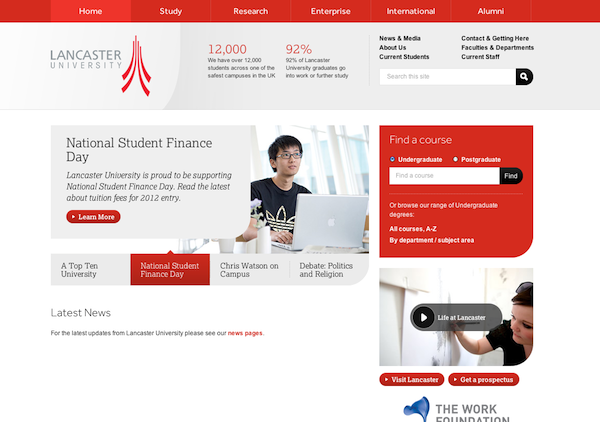
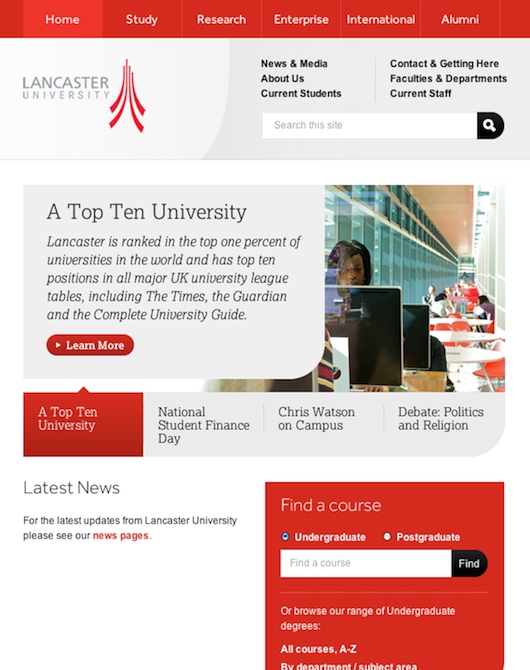
Now that you know the who, how and why, it’s time to bring everything together in a killer homepage design that will not only look great, but function seamlessly as a visitor’s guide to your site. Many well-designed sites begin with a large introductory headline and a brief opening paragraph that gives the visitor a snapshot of what the company is about or what it is selling. The funneling occurs with individual modules that target a specific audience. Designs should be clean and contain good contrast to quickly identify elements. Headlines should be specific, leaving little doubt who the following information is intended for. Typically, “more” or “continue” buttons are used, prompting the visitor to explore the next level of the site. Often pictures of a product or other graphical elements are used to entice the visitor into wanting more. Here are examples of sites that do this well. Good Homepage Traffic Funneling Good Homepage Traffic Funneling Good Homepage Traffic Funneling Good Homepage Traffic Funneling Good Homepage Traffic Funneling Good Homepage Traffic Funneling

Conclusion

Your homepage is not only a first impression, but the starting point to an experience. A good homepage is a spring board that motivates people to explore more important areas of your site. It clearly direct visitors to the information they need the most to get them to a final destination. And if their journey is a pleasant one, you're one step closer to a repeat visitor, fan, and even customer. Happy trails!