We are the digital agency
crafting brand experiences
for the modern audience.
We are Fame Foundry.

See our work. Read the Fame Foundry magazine.

We love our clients.

Fame Foundry seeks out bold brands that wish to engage their public in sincere, evocative ways.


WorkWeb DesignSportsEvents

Platforms for racing in the 21st century.

Fame Foundry puts the racing experience in front of millions of fans, steering motorsports to the modern age.

“Fame Foundry created something never seen before, allowing members to interact in new ways and providing them a central location to call their own. It also provides more value to our sponsors than we have ever had before.”

—Ryan Newman

Technology on the track.

Providing more than just web software, our management systems enhance and reinforce a variety of services by different racing organizations which work to evolve the speed, efficiency, and safety measures, aiding their process from lab to checkered flag.

WorkWeb DesignRetail

Setting the pace across 44 states.

With over 1100 locations, thousands of products, and millions of transactions, Shoe Show creates a substantial retail footprint in shoe sales.

The sole of superior choice.

With over 1100 locations, thousands of products, and millions of transactions, Shoe Show creates a substantial retail footprint in shoe sales.

WorkWeb DesignRetail

The contemporary online pharmacy.

Medichest sets a new standard, bringing the boutique experience to the drug store.

Integrated & Automated Marketing System

All the extensive opportunities for public engagement are made easily definable and effortlessly automated.

Scheduled promotions, sales, and campaigns, all precisely targeted for specific demographics within the whole of the Medichest audience.

WorkWeb DesignSocial

Home Design & Decor Magazine offers readers superior content on designer home trends on any device.


  • By selectively curating the very best from their individual markets, each localized catalog comes to exhibit the trending, pertinent visual flavors specific to each region.


  • Beside the swaths of inspirational home photography spreads, Home Design & Decor provides exhaustive articles and advice by proven professionals in home design.


  • The art of home ingenuity always dances between the timeless and the experimental. The very best in these intersecting principles offer consistent sources of modern innovation.

WorkWeb DesignSocial

  • Post a need on behalf of yourself, a family member or your community group, whether you need volunteers or funds to support your cause.


  • Search by location, expertise and date, and connect with people in your very own community who need your time and talents.


  • Start your own Neighborhood or Group Page and create a virtual hub where you can connect and converse about the things that matter most to you.

June 2021
Noted By Joe Bauldoff

The Making and Maintenance of our Open Source Infrastructure

In this video, Nadia Eghbal, author of “Working in Public”, discusses the potential of open source developer communities, and looks for ways to reframe the significance of software stewardship in light of how the march of time constantly and inevitably works to pull these valuable resources back into entropy and obsolescence. Presented by the Long Now Foundation.
Watch on YouTube

210 The secret to web copy that captivates

Start strong and maintain sharp, focused writing to lead readers inch-by-inch down the page.

March 2021
Noted By Joe Bauldoff

The Case for Object-Centered Sociality

In what might be the inceptive, albeit older article on the subject, Finnish entrepreneur and sociologist, Jyri Engeström, introduces the theory of object-centered sociality: how “objects of affinity” are what truly bring people to connect. What lies between the lines here, however, is a budding perspective regarding how organizations might better propagate their ideas by shaping them as or attaching them to attractive, memorable social objects.
Read the Article

775 Boost email open rates by 152 percent

Use your customers’ behavior to your advantage.

February 2014
By Jeremy Girard

Deal-Breakers and Dead-Ends: Six Turn-Offs That Alienate Website Visitors

These glaring missteps will repel a potential new customer faster than a cheesy pick-up line and cheap cologne.
Read the article

Deal-Breakers and Dead-Ends: Six Turn-Offs That Alienate Website Visitors

Without question, the task of driving new visitors to your company’s website is not easy. Success requires serious strategic planning and a significant investment of resources, from content marketing and social media promotion to search engine advertising and offline marketing initiatives. So once those hard-won visitors arrive, why in the world would you immediately turn them away? Well, you certainly wouldn’t do so intentionally, but there may be deal-breakers and dead-ends lurking within your site that will repel a potential new customer faster than a cheesy pick-up line and cheap cologne. Here are six mood-killers that you must avoid if you hope to woo new customers, entice them to engage with your site and provide such a positive experience that they will tell all their friends what a great catch you are:

1. Download our app

If you’ve invested in creating an app for your brand, naturally you want to bring this to the attention of mobile visitors and encourage them to download it. But it’s all too easy to cross the line between promoting your app and perturbing your customer. Recently, I was in the process of working on an email marketing campaign using the popular service Constant Contact. I found myself with a spare moment between meetings, so I grabbed my iPad and set out to make a few quick edits to my draft. When I logged into the site and selected the email I wanted to edit, I was greeted with a message asking me if I wanted to download “QuickView”, their app for iPad and iPhone. ConstantContact But I was in a rush and had no interest in downloading and figuring out how to use their app to accomplish the simple task of making changes to an email I had already begun crafting. So I clicked “No, thanks” and was then returned to my list of emails. Once again, I clicked the email that I wanted to edit – and once again I was greeted with the prompt to download the app. I was stuck in a loop of non-productivity. Unless I installed the app, I could not complete my desired action on my iPad. By any standard, this was a very poor user experience. Unfortunately, this is not an unusual scenario. If you browse the Web on your mobile device with regularity, you’ve undoubtedly encountered this type of “Download our app!” a number of times. However, the problem arises when downloading an app is the only viable way to interface with a site via a mobile device and the objective of providing a good user experience is sacrificed in the interest of securing a permanent spot in the user’s pocket. Instead of trying to force your app on mobile visitors, take a more subtle approach. For example, displaying a small banner at the top of your site’s mobile view is a great way to make users aware of your app without disrupting their workflow or compromising the quality of their experience. Never, ever require your visitors to download an app to use your site; rather show them the respect of allowing them to interact with your brand in the way that they most prefer, whether that’s through a browser or through your app.

2. Give us your digits

We get it. When a new visitor comes to your website, you want to capture as much information about them as quickly as possible so that you can continue your engagement with them long after they’ve moved on to other corners of the Web. With this motivation in mind, there are many sites that immediately greet new visitors with a pop-up-style message. Instead of seeing the expected home page content, the user is presented with a request to complete a form to provide their contact information in exchange for a welcome discount offer or to follow the company on Facebook for future updates and promotions. Either way, these pop-ups are very disruptive to the user experience and provide obstacles that only make it more difficult for the visitor to accomplish what they originally came to the site to do. Invision Think about this experience for a moment. Yes, it would be ideal if every visitor to your site would willingly complete a short form that gives you invaluable data. But in reality, no one comes to your site for the express purpose of helping you market to them, so by giving such a message top priority, you are telling them that your needs are more important than theirs. That’s a pretty poor way to start the conversation. This phenomenon is so pervasive that there is even an entire website – tabcloseddidntread.com – dedicated to these types of interruptive messages. While the writing on the site is a bit snarky, the point it makes is a valid one: these messages create a poor user experience from the outset. As a result, any value you might gain in collecting user data is quickly negated if that user has no interest in continuing their engagement with you because you’ve created such a negative first encounter. Instead of leading off the conversation with your survey request, Facebook follow prompt or current promotion, simply allow your visitors to dive right into the site to find the information they’re seeking or complete their desired task. Keep your mailing list sign-up and Facebook links in your site’s universal framework, and if you do your job in creating a positive experience for them, your visitors will willingly allow you to become a presence in their email inbox or their Facebook news feed all on their own.

3. One-size-fits-all framework

Today’s website visitors are accessing our sites on a wide ranging variety of devices with a myriad of different screen sizes, and yet, many sites are still built with the “desktop-only” mindset of years ago. This is a major strike for users on mobile devices who expect more from their experience than simply seeing the desktop site shrunk down to display on their small screen, with text that’s illegibly tiny and links that are nearly impossible to press. The Web is no longer a one-size-fits-all world. That being said, while one “size” may not fit all, you can still have one site that will work seamlessly on a wide variety of screen sizes and devices. By employing responsive design, you can build a singular jack-of-all-trades workhorse that dynamically reflows its layout based on the user’s screen size. The image below illustrates the difference between how desktop-only layout (i.e., the “do nothing” approach) is rendered on a phone’s browser versus a site that’s optimized for small screens with a responsive approach. Envision Read more: Website Design for a Multi-Device World

4. Vexing video

Video can be a powerful way to convey information, but if that video fails, then your message is lost. There are a few ways that video can provide a stumbling block to engagement with your site visitors. First and foremost, not all video formats are compatible with all devices. For instance, Flash videos will not play on iPhones and iPads, which means that instead of seeing your excellent video content, every user on an iOS device will get a message that says something to the effect of “This video cannot be shown on your device.” Other visitors may not want to download a large video due to limited bandwidth or data download concerns, and as a result, your content is not able to achieve the effect you desire. In still other cases, your visitors may be able to download and view a video but may not be able to use audio – perhaps because they are in a public area, such as an office or store. Video without audio is fairly anti-climactic, so if the only way they can consume your message is by watching and listening, then you will leave these visitors cold. The moral of the story is this: If you are going to use embedded video on your site, make sure to choose a format that can be played on all devices and to reinforce its key message and content in other areas for visitors who may not want to watch or listen to a video.

5. The mystery of the disappearing navigation

Your website’s navigation structure is a critical component of the user experience, and the links it contains are the gateway to the information your visitors are seeking. For sites with lots of pages and a deep sitemap, a common design schema is to use drop-down menus that show subpages contained underneath the site’s top-level navigation choices. These drop-down menus are typically powered by Javascript. But what happens if the user has disabled Javascript in their browser or if that script fails to load for some reason? When this happens, your navigation menus may never be shown, leaving visitors stranded with no way to easily maneuver through your site. Failure to load a script is not the only way that navigation suddenly goes missing. Some sites with very elaborate navigation options for the desktop version eliminate the bulk of those options for mobile devices. This can create a dead-end for users who are familiar with the desktop version and are left searching aimlessly for links they will never find. Instead of eliminating links for smaller screens, find ways to present the same content in a way that’s better suited to the device’s display. Additionally, make sure that your site’s navigation has a fallback option should a script fail to load or something else unexpected happens.

6. Page is loading…

Today’s websites have become fat, bloated behemoths. Oversized images and animations, embedded videos and other features have contributed to the substantial size increases we have seen in webpages over the past few years. Bigger pages mean longer load times, which is a major turn-off for visitors who have no lack of other suitors vying for their time and attention online. Better website performance will yield better website results. By optimizing your site’s performance and ensuring that it loads quickly even for visitors with slower connection speeds, you can avoid showing users a half-loaded page and hoping that they will wait around to see the rest. More often than not, that’s a losing gamble, and the visitor you worked so hard to win will turn elsewhere to find a site that will perform according to their expectations.
May 2014
By Jeremy Girard

Requiem for the Flash Intro: Seven Dying Trends in Website Design

If your site features one or more of these passé design trends, it’s time for a refresh to avoid looking as dated as acid-wash jeans and a bad perm.
Read the article

Requiem for the Flash Intro: Seven Dying Trends in Website Design

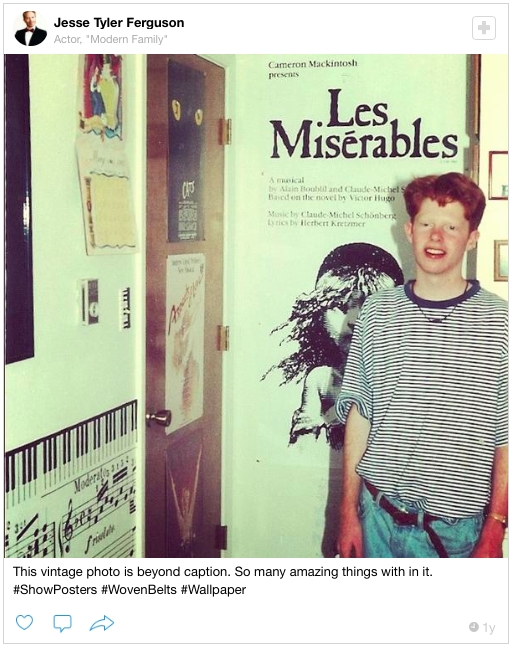
Thanks to the now ubiquitous #TBT (that’s “throwback Thursday” for those of you who don’t speak hashtag), every week we’re all treated to a cringe-inducing trip down memory lane that takes us on a tour of our most regrettable fashion choices, whether it’s the bad perms and acid-washed jeans we sported in the 80s, the grunge-era plaid shirts and Doc Martens of the 90s or the velour sweatsuits and Carrie Bradshaw-inspired nameplate necklaces we left behind in the early aughts. TBT Just as in fashion, website design trends come and go. What’s popular one day is old news the next. And just as you wouldn’t wear shoulder pads and stirrup pants to a sales meeting, you don’t want your website to be an embarrassing amalgamation of passé design trends. After all, if your website looks dated, it won’t inspire confidence among prospective customers that you’re on top of your game – no matter what game it is that you’re playing. Here are seven once-popular design trends that are fading fast – and that you should purge from your website as soon as you can:
1. Flash intros

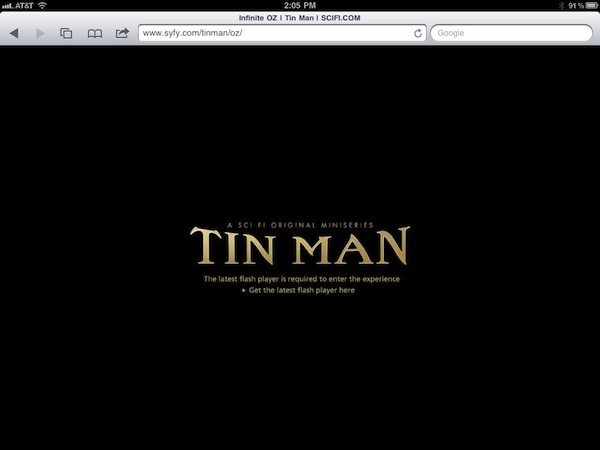
Once upon a time, everybody and their brother wanted a Flash intro to create a memorable first impression. These days, though, having a Flash intro is a recipe for disaster. Flash First, in today’s era of mobile surfing, speed and simplicity win the day. Keep in mind, too, that Flash and iOS do not mix, so your site won’t even be accessible to users on Apple gadgets. Also, today’s visitor demands more control and fewer bells and whistles that only serve as obstacles to accomplishing their end goal.
2. Pop-over windows

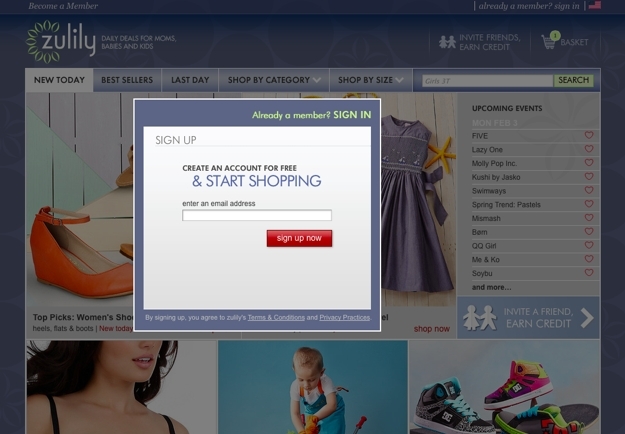
As site owners became increasingly eager to turn their web presence into full-blown conversion engines, the pop-over window rose to popularity. As soon as a new visitor lands on the site, BAM! they are greeted with a request to complete a form to provide their contact information in exchange for a welcome discount offer or to follow the company on Facebook for future updates and promotions, thus giving the company all the ammunition they need to continue their engagement long after that visitor has moved on to other corners of the Web. Zulily But while these pop-overs are good for site owners (at least in theory), they are very disruptive for the user and provide roadblocks that only make it more difficult for them to accomplish what they originally came to the site to do. As a result, any value that might be gained in collecting the user’s data is quickly negated if that user has no interest in continuing their as a result of this negative first encounter. Thankfully, good UX is winning this battle, and the pop-over is falling quickly out of favor. Reality has set in that no one comes to a site for the express purpose of helping the site’s owner market to them, so it’s hardly the best way to lay a foundation for a successful long-term relationship. Instead of leading off the conversation with your survey request, Facebook follow prompt or current promotion, simply allow your visitors to dive right into the site to find the information they’re seeking or complete their desired task. Keep your mailing list sign-up and Facebook links in your site’s universal framework, and if you do your job in creating a positive experience for them, your visitors will willingly allow you to become a presence in their email inbox or their Facebook news feed all on their own. Read more: Deal-Breakers and Dead-Ends: Six Turn-Offs That Alienate Website Visitors
3. Animated billboards

Oversized, rotating slideshows have become a common fixture on home pages in recent years, largely because they provide a way to present several key messages to the visitor without requiring them to scroll or to click past the initial page. However, UX tests show that these animated presentations are not as effective as we’d like to think. While the initial message in the carousel often prompts a click, the effectiveness of subsequent messages in the loop drops dramatically because many users do not stick around to see all of the slides. Other users ignore these animated areas completely, perceiving them as banner advertisements that should be glossed over in search of more meaningful content. The billboard remains a popular design feature; however, the trend is growing toward featuring a singular strong message in this area combined with a striking visual image. Streamlining and simplifying allows this one key idea to come across loud and clear rather than being lost among a muddled array of messages that are presented indiscriminately in the hopes that one will result in the desired outcome.

4. Information overload

Continuing with the theme of reductionism, today’s most successful websites pare down the information presented on the home page in order to create a cleaner, more focused presentation. This is in stark contrast to the approach that many sites took for years, which was to stuff the home page with as much information as possible in the hopes that visitors would find whatever they might be looking for on that page without having to dig any deeper. The result is a page that is utterly lacking in direction; nothing is emphasized because everything is emphasized. In the end, instead of being guided intuitively toward the information they seek, users are driven away by an overwhelming mess of content that is not properly organized and prioritized. To avoid this pitfall, focus on only the most important information for visitors while providing easy pathways, such as search tools and user-friendly site navigation, to help them find the content that lies deeper in the site. This approach will ultimately yield a better experience for your users and therefore better results for your company.

5. Drop-down menus

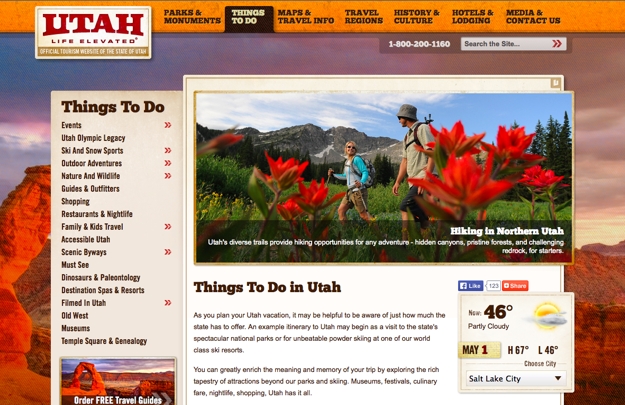
For years, the drop-down menu has been the go-to solution for streamlining a site’s primary navigation options while providing easy access to secondary pages. But with the advent of touch-based devices, which do not have a hover state, drop-down menus no longer serve the needs of all users. The simple fact of the matter is that with the rapid growth of mobile Web use, you simply can’t afford to risk leaving these visitors stranded with no way to delve beyond your site’s home page. Instead, a better solution for modern websites is to feature secondary page navigation options along the top or side of the page within the relevant section of the primary navigation. Utah Read more: 3 Simple Rules for Navigation That Will Boost Your Website’s Performance
6. Contact forms

The contact form has long been a staple of websites – so much so that it’s often used in place of providing other means of contacting a company, such as a phone number or email address. However, more and more, site owners are choosing to eliminate this form altogether in an effort to provide a more personal, service-driven experience. Instead of having a visitor’s first interaction with their company occur via a cold, faceless web form that goes to an anonymous recipient and assures no timeline for response, the company elects to provide only their phone number so that the customer’s needs can be addressed immediately and directly by a live human being. While contact forms are not likely to disappear completely anytime soon, what is going away is the practice of relying on these forms as the sole vehicle for communication with customers and prospects.

7. Third-person narratives

Your website should embody the voice and personality of your brand. As such, it simply makes no sense for the content to be written from a third-person perspective, as if it’s being read to the user by a distant omniscient narrator. Instead, writing in the first-person creates a softer, more approachable tone that puts a human face on your company. It’s the difference between saying, “At Sanford & Son Remodeling, their goal is to ensure your satisfaction.” and “At Sanford & Son Remodeling, our goal is to ensure your satisfaction.” Which one feels more authentic? More warm and personable?

Beyond keeping up with the Jonses

Remember: keeping pace with the latest trends in website design is more than skin-deep. It’s not about having more bells and whistles than your competition; it’s about providing the best experience for all users, no matter how or where they’re accessing your site. By staying ahead of the curve, you’ll ensure that your site continually evolves to meet the needs and expectations of users who are constantly adapting to new devices and technologies.